

Category: Other
Author’s Name: Hubert Scheurig
Homepage: http://hscheurig.co.cc/1/dicorview.htm
Published: Feb 27, 2008
A free viewer for Dicom RT Files. For more information: http://hscheurig.co.cc/1/dicorview.htm.

Category Other
Author’s Name Ryan
Published Nov 18, 2009
Notes to get a USB external HD to talk to an 810 box. Not supported by ADAC or Pinnacle. These are only my notes, and they work for me, but are not guaranteed.
Category: Other
Author’s Name: Sarah Quirk
Published: Sep 29, 2016
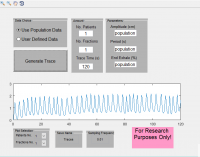
S Quirk et al. External respiratory motion: Shape analysis and custom realistic respiratory trace generation. Medical physics 39 (8), 4999-5003.
External respiratory trace generator developed using population data from external motion of cancer patient database. The software can be run in two modes: population and user defined. In population mode the traces are generated entirely based on the population data. In user generated mode some characteristics can be manipulated including amplitude, period, end exhale phase, and variability amount. The traces are saved as csv files so they are easy to use and convert for any purpose. Don’t hesitate to contact me if you have any questions.

Category: Other
Author’s Name: Richard Benson
Published: Oct 02, 2010
Radiation Exposure Cancer Risk Calculator
An MS EXCEL spreadsheet which calculates the risks of developing various forms of cancer for given exposure, age at exposure and attained age. Simple graphical presentations make it easy to interpret. Based on models described in BEIR VII.
Category: Other
Author’s Name: PyMedPhys contributors
Homepage: www.pymedphys.com
Distributed with custom license file? Yes
Published: Mon Jul 08, 2019 3:39 pm
PyMedPhys, a Medical Physics monolithic git repository on GitHub for sharing, reviewing, improving, learning and distributing open source Medical Physics code.
See https://pymedphys.com and https://github.com/pymedphys/pymedphys

Category: Other
Author’s Name: Darcy Mason
Homepage: www.pydicom.github.io
Distributed with custom license file? Yes
Published: Oct 12, 2008 | Updated: Feb 01, 2013
Read, modify and write DICOM files using the python language.
Pydicom is a pure python package for working with DICOM files. It was made for inspecting and modifying DICOM data in an easy “pythonic” way. The modifications can be written again to a new file. As a pure python package, it should run anywhere python runs without any other requirements.
Here is a short code sample from an interactive python session:
Code:
>>> import dicom

>>> plan = dicom.read_file("rtplan.dcm")

>>> plan.PatientName

'Last^First^mid^pre'

>>> plan.dir("setup") # get a list of tags with "setup" somewhere in the name

['PatientSetupSequence']

>>> plan.PatientSetupSequence[0]

(0018, 5100) Patient Position CS: 'HFS'

(300a, 0182) Patient Setup Number IS: '1'

(300a, 01b2) Setup Technique Description ST: ''

>>> plan.PatientSetupSequence[0].PatientPosition = "HFP"

>>> plan.save_as("rtplan2.dcm")
Category: Other
Author’s Names: Jeremy Coulter, Siobhan Ozard
Published: Aug 11, 2006 | Updated: Aug 11, 2006
A customizable Excel spreadsheet for calculation of the monitor units necessary for an orthovoltage treatment field. Complete with energy, applicator, and cutout options.
The Orthovoltage Treatment Calculator was created in Microsoft Excel and is dependent on data stored in tabular format to the right of the print area. This facilitates the possibility of customization for users with different treatment units and data. The dropdown menus in the print area lookup the options and data stored in these tables.
The user first selects the potential energy that the orthovoltage unit is to operate at, and then selects the applicator that is to be used. The list of available applicator options is dependent on the selected potential energy. In the event that the source to surface distance is greater than or less than the length of the applicator, a positive or negative value may be entered into the “STAND OFF†field to produce an inverse square law correction that will be applied to the corrected dose rate.
Backscatter factors are tabulated from BJR 25 for each applicator and are accessed by the spreadsheet if no cutout is to be used during treatment. The worksheet will calculate the backscatter factor of an optional cutout based on its selected shape and associated dimensions. The calculated area is automatically converted to an effective diameter. The effective diameter is used to yield an accurate backscatter factor using interpolated TG-61 data from Ma et al. [Med. Phys. 28, No. 6, June 2001.]. For cutouts that are too irregular to be classified as a standard shape, the user can manually input the area.
After entering the total treatment dose and the number of fractions per treatment, the worksheet will return the calculated values for the corrected dose rate and the monitor units per fraction. The worksheet also provides the appropriate spaces for the input of the patient name, patient ID number, treatment site, and field number. For verification purposes, the current time is automatically stamped at the top of the print area and there is room for handwritten signatures of the pertinent staff at the bottom. A completed calculation sheet consists only of printer-friendly grayscale colors (see screenshot 2).

Category: Other
Author’s Name: Nathan Childress
Homepage: www.macorva.com
Published: May 21, 2013
A simple Windows GUI that runs a DICOM receiver (SCP node) with customizable ports and AE title.
Mobius Receiver is a simple way to send and receive DICOM files. It is an open-source graphical interface to the “dcmrcv” and “dcmsnd” utilities from the dcm4che toolkit.

Category: Other
Author’s Name: Nathan Childress,
Homepage: www.macorva.com
Published: Apr 23, 2011
This is a very simple file transfer interface, designed to move or copy files from one predefined directory to another directory with one click. Either directory can be a network drive.
To use, change the source and destination directories by entering the password “mobius”. You can also go to File | Options and choose to have the original files deleted after successful transfers, and pick the file types to transfer (by default, all files are transferred).
This tool is designed to be setup by one person one time, so others have easy access to a one click file transfer tool.
Mobius Copy can be set to automatically transfer files upon opening, and close automatically. This is useful for setting folders once, then placing a shortcut in the Startup folder of Windows, or using Windows Scheduled Tasks.
Thanks to Eli Stevens and Geordan Rosario for creating this tool.

Category: Other
Author’s Name: Catherine Jones
Published: Jul 12, 2013
Folder contains C++ code for DICOM reading and writing functions, as well as two programs compiled for Windows that uses these functions. The first simply displays the header of a DICOM file. The second displays the header info in a spreadsheet and the
Please read the enclosed file README.htm.

Category: Other
Author’s Name: Scott Dube
Published: Thu Dec 31, 2009 12:27 pm
Brass Mesh Bolus for Chestwall Irradiation